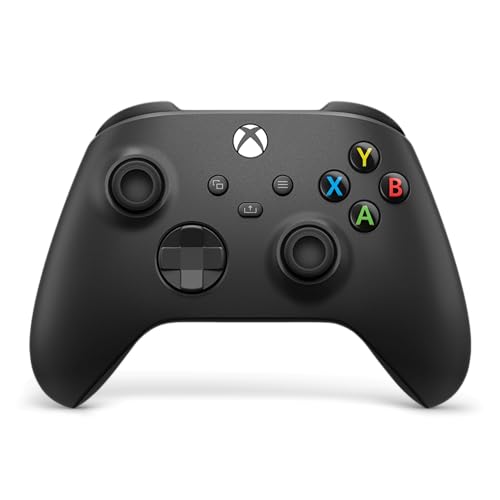
Xbox Wireless Controller — Best Overall
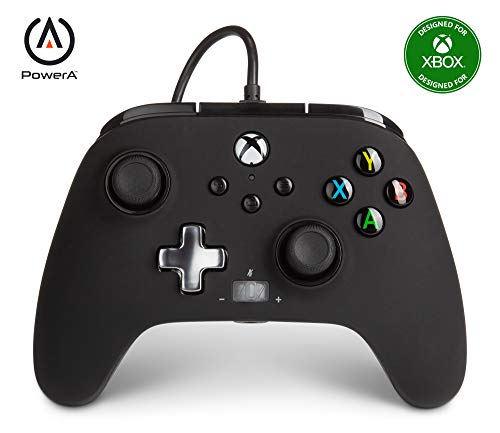
PowerA Enhanced Wired Controller — Best Budget
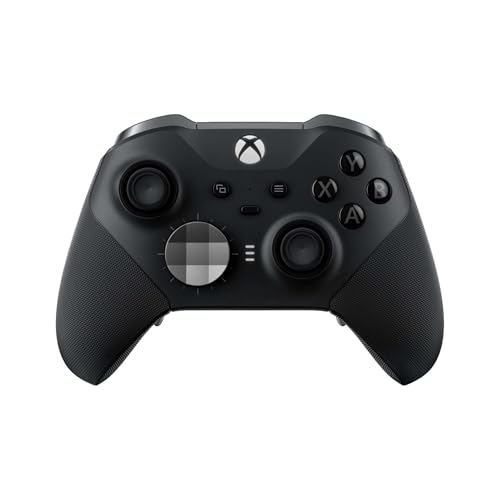
Xbox Elite Series 2 — Best Premium
An Xbox controller search during Black Friday is three different pads, not one “best deal” banner. The wired PowerA is a cabled licensed pad with two extra buttons and no radio. The standard Xbox Wireless Controller in Carbon Black is the everyday pad: Xbox Wireless, Bluetooth, USB-C, a hybrid D-pad, and a Share button. The Elite Series 2 is the pad with adjustable-tension sticks, hair-trigger locks, a wraparound grip, and on-controller profiles. Those are feature differences. They are not a price ranking, and this page does not invent one.
The photo on each listing has to match the pad in the title. A standard matte black Xbox pad does not grow Elite paddles because a seller uses the word elite in a sentence. A wired pad does not become wireless because the box says Xbox. Read the connection line before you read the color.
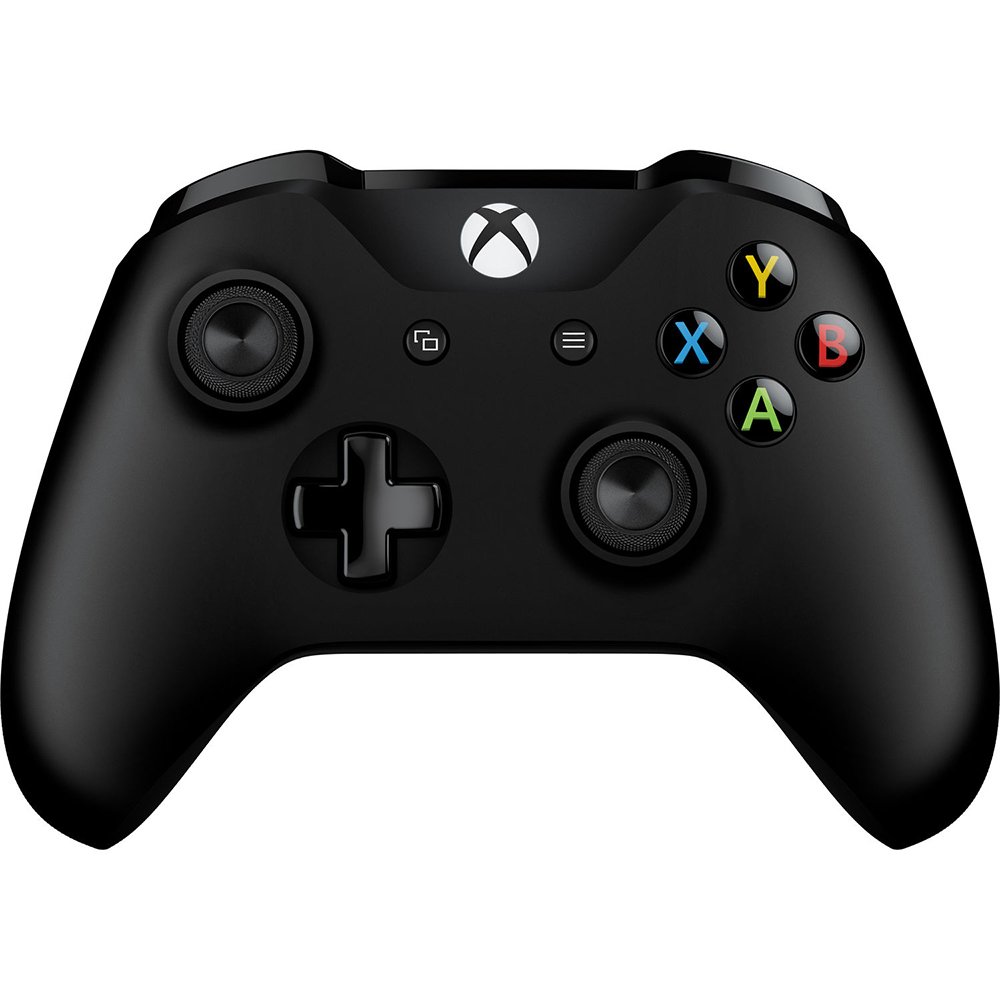
The Carbon Black Xbox Wireless Controller, model EP2-29929, is the Best Overall pad because it is the normal current controller: it connects over Xbox Wireless and over Bluetooth, it charges or plays over USB-C, and it has the hybrid D-pad, textured triggers and bumpers, and a Share button. It does not have the Elite’s interchangeable rear paddles. That missing hardware is why it is the everyday controller rather than the specialty one. Most people buying a second pad, a replacement for a drifting stick, or a controller for a new console want this shape.
Power is AA batteries. Microsoft’s own note on this listing puts battery life around 40 hours. That is their figure for this test note, not a measurement of a half-used pack you already own, and not a promise that Bluetooth and Xbox Wireless drain the cells the same way. A rechargeable pack is a separate accessory. Do not assume the Carbon Black box includes one just because some photos in the wider Xbox aisle show a charging brick.
The 3.5 mm headset jack is on the pad. Chat and game audio through a wired headset is the simple setup. Wireless headsets are their own products. Color is Carbon Black. Other colors of the same wireless controller exist and they are not this model number. If you need a specific finish, match EP2-29929 or accept that you are buying a different colorway on purpose.
It is listed for the consoles and PCs the current Xbox wireless pad supports. A PlayStation is not one of them. A Black Friday bundle that pairs this pad with a PlayStation console is two products forced into one photo. Buy the pad for an Xbox or a Windows PC that can use Xbox Wireless or Bluetooth, and check the dongle or the console’s built-in radio rather than hoping a cable creates a platform.
This is the wrong overall pick if you refuse batteries and you only play at a desk. That is the wired PowerA. It is also the wrong pick if you already know you want tension adjustments and rear paddles. That is the Elite conversation, with the caveat in that section about what the box actually contains.
The PowerA Enhanced Wired Controller in black is the Best Budget pad because the feature set is simpler: it is wired only. There is no Xbox Wireless radio and no Bluetooth radio. The cable is detachable USB. You plug it in and you play. That gap is the role. It is not a claim that a given seller’s number is the lowest one on the page this week.
What it does have, on the listing, is two mappable Advanced Gaming Buttons, a 3.5 mm stereo headset jack, and a volume dial with chat mute. Those are real extras on a wired pad. They do not turn it into an Elite. The license line says it is officially licensed for Xbox Series X|S and also listed for Xbox One and Windows. “Officially licensed” is the phrase to see. An unlicensed third-party pad can look similar in a thumbnail and then fail on a console that expects a licensed device. Read the Designed for Xbox mark in the title and on the shell in the photo.
The cable is the whole connection. A detachable cable is convenient until you lose it. Confirm the listing includes the cable, not “controller only, cable sold separately.” Wireless lag is not your problem. Cable reach is. A couch that sits far from the console needs a longer cable than the one in a desk setup. Do not plan to add Bluetooth later. This model does not have that radio.
Skip the PowerA if you want to play from across the room without a wire, or if you want to use the pad on a phone or tablet over Bluetooth. Those are wireless-controller jobs. Skip it if the two back buttons are the only reason you are looking and you also want adjustable stick tension. Tension is the Elite’s feature, not this one’s.
The Best Premium pad is the Xbox Elite Wireless Controller Series 2 in black. The features that earn that label are on the controller itself: adjustable-tension thumbsticks, shorter hair-trigger locks, a wraparound rubberized grip, swappable stick toppers, D-pads, and paddles, and space for profiles stored on the controller. The listing also describes Xbox Wireless, Bluetooth, a USB-C cable, and a rechargeable battery with an “up to 40 hours” note from the page. Those are controller features.
The listing title says Series 2 Core. Another line on the same page describes a full accessory kit: a carrying case, extra thumbsticks, paddles, D-pads, an adjustment tool, and a charging dock. Those two descriptions do not agree. Until that conflict is resolved on the live page, do not treat the case, the dock, or a full set of spare parts as included. Buy this ASIN for the Elite controller. Open the current “in the box” line before you count on anything that is not the controller and the cable you can see. This page will not tell you the kit is in the carton.
The photo is the black Elite pad, with the textured grip and the faceted D-pad, not the smooth standard Carbon Black pad. If a seller’s gallery shows a standard pad, you are not looking at this product anymore. Rear paddles are easy to hide in a front-on photo. The grip texture and the D-pad shape are the visible tells on the catalog image.
Elite pads are heavier and more adjustable than the standard wireless controller. They are a poor gift for someone who wants a simple pad and will never open a tension tool. They are the right search for someone who already plays with back buttons and wants the stick tension on the pad rather than in a menu they forget. Profiles stored on the controller matter when you move between an Xbox and a PC and you do not want to rebuild the layout every time. That is the feature. The dock is not, until the box list and the title say the same thing.
Stick layout is worth a minute before Black Friday checkout. The standard Xbox pad and the PowerA use the usual offset sticks and a familiar face-button diamond. The Elite keeps that diamond and then adds tension you can change, plus the rear buttons the other two do not pretend to match. If you are replacing a pad you already like, stay in that layout family. If you are buying a first pad for a new console, the Carbon Black wireless model is the one the console expects people to recognize. A child who will lose a cable in a couch is a wireless-pad household. A desk racer who hates batteries is a PowerA household. Write that down before the color starts making the decision.
Firmware and the Xbox Accessories app matter more on the Elite than on the other two, because profiles and stick behavior live there as well as on the pad. The standard wireless pad also takes updates. Update once on a console you trust, then retest the sticks. A pad that fails a stick test after an update is a return, not a project. The PowerA’s mapping for the two extra buttons is its own menu path. Read it once. Do not assume the buttons copy the Elite’s paddle positions. They are extra buttons on a wired pad, and that is all the listing promises.
Share-button habits are small and real. The standard wireless controller has a Share button for captures. If someone in the house hits it constantly, that is a button you can explain, not a defect. The Elite’s extra controls are easier to bump if you grip the pad tightly. Spend one evening with the tension and the locks before you decide the pad is “too much controller.” Too much is a fair conclusion. It should be your conclusion after you have felt the grip, not a guess from a front photo.
Xbox Controller Black Friday Deals 2026: How to Choose
Pick the connection first. Wired only is the PowerA. Wireless with the standard layout is the Carbon Black Xbox pad, model EP2-29929. Adjustable sticks and an Elite body are the Series 2, with the Core-versus-kit warning above. Then match the color in the title to the photo. Carbon Black is not “any black Xbox pad.” Jet black Elite is not Carbon Black.
Check the platform. Series X|S and Xbox One are the home consoles these licensed pads are aimed at. Windows is listed on the PowerA and is a normal target for the Xbox wireless pad over the radio or Bluetooth. Do not buy any of these for a PlayStation or a Nintendo and expect the buttons to map themselves. A “universal” claim on a different brand is a different product.
Batteries and cables are the unglamorous Black Friday miss. The standard wireless pad uses AAs unless a rechargeable pack is named in the box list. The Elite page describes a rechargeable battery. The PowerA needs its USB cable in the box. Headsets are separate. A bundle photo of a headset on a pad is only a bundle if both names are in the title. Otherwise you are looking at a lifestyle crop.
Drift is the used-controller problem. Thumbsticks that move the camera when your thumb is off them are not something a firmware slogan fixes in the product photo. Prefer a new pad if you cannot test the sticks. Renewed pads should say the sticks were replaced, not merely that the shell was wiped. This page’s three listings are the new products described above. A used grade is a different offer.
When a pad arrives, test every face button, both sticks in a full circle, the D-pad, the triggers, and the bumpers before the return window gets casual. On the PowerA, confirm the two extra buttons map. On the standard Xbox pad, pair it once over Xbox Wireless and once over Bluetooth if you will use both. On the Elite, set one tension and one profile, and then read the box contents against the title. If the title still says Core and the carton has no dock, you got the controller the title named. Do not argue with a listing you did not re-read.
Keep the retail carton until the stick test is done. A pad that looks fine in a two-second menu and then drifts in a game is the return you still have time to make. Note which USB port you used, because a loose console port can feel like a bad cable on the PowerA. On the wireless pads, forget the controller in the console’s device list if you are sending it back, so the next pad does not fight a ghost pairing.
Black Friday will keep mixing these three pads into one row of black plastic. None of the three is a steering wheel, a fight stick, or an Adaptive Controller. Those are other Xbox inputs with other listings. The PowerA is the licensed wired pad. The EP2-29929 is the Carbon Black wireless pad. The Elite Series 2 is the adjustable pad whose title says Core, so the accessories stay uncounted until the page agrees with itself. Match the pad, then look at the offer.

![Forza Horizon 5: Standard Edition – Xbox Series X|S – Xbox One & Windows [Digital, Forza Horizon 5: Standard Edition – Xbox Series X|S – Xbox One & Windows [Digital Code]](https://funnyscreenshots.com/wp-content/uploads/2026/11/g0162-product-1.jpg "Best Xbox Games Black Friday Deals 2026")